
$41.81
Add to Cart
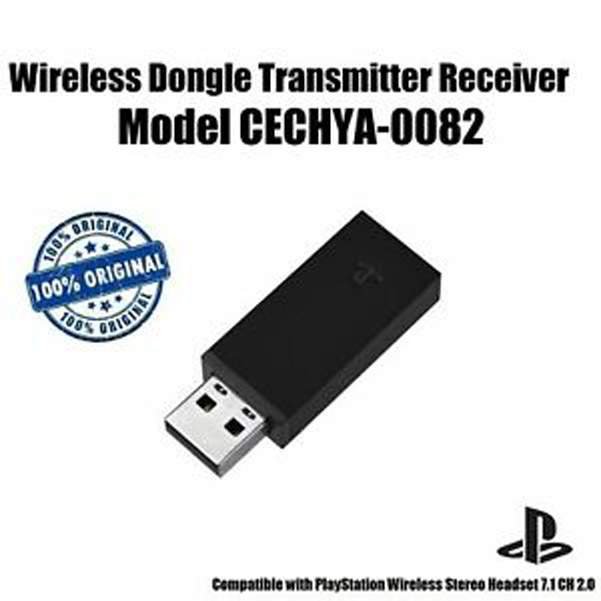
Genuine Sony PlayStation Gold Wireless Headset USB Dongle Receiver CECHYA-0082
More than 10 available
Details
Shipping: Australia: free (more destinations)
Condition: Used
Returns: 30 days, buyer pays return shipping (more)


Genuine Sony PlayStation Gold Wireless Headset USB Dongle Receiver CECHYA-0082
Brand Name:Sony
Model??CECHYA-0082 .
Includes the USB dongle Only. (No headphones)
Compatible with : Sony Playstation Gold Wireless CECHYA-0083 Headset.
This will NOT pair with CECHYA-0080 ( Older generation Sony Gold Headset ).
Please note that this dongle will pair with Sony Playstation Gold Wireless CECHYA-0083 Headset Only ( Will not work with other models ).
When you receive it, you must pair it to your headphones .
If your headset does not respond when you try to operate it, reset it by doing the following:
1: Connect the wireless adaptor to a PS4 system or other powered USB port.
2: Insert a small pin or similar object (not included) into the hole surrounding the reset button in the wireless adaptor, and push in for at least one second.
3: On the headset, hold down the MUTE button and the VSS button.
4: While still holding down the MUTE button and the VSS button, slide the power/audio mode switch to position ??1?? or ??2??.
Package Include??
1 x Genuine Sony PlayStation Gold Wireless Headset USB Dongle Receiver CECHYA-0082 ( Bulk Pack )
Brand Name:Sony
Model??CECHYA-0082 .
Includes the USB dongle Only. (No headphones)
Compatible with : Sony Playstation Gold Wireless CECHYA-0083 Headset.
This will NOT pair with CECHYA-0080 ( Older generation Sony Gold Headset ).
Please note that this dongle will pair with Sony Playstation Gold Wireless CECHYA-0083 Headset Only ( Will not work with other models ).
When you receive it, you must pair it to your headphones .
If your headset does not respond when you try to operate it, reset it by doing the following:
1: Connect the wireless adaptor to a PS4 system or other powered USB port.
2: Insert a small pin or similar object (not included) into the hole surrounding the reset button in the wireless adaptor, and push in for at least one second.
3: On the headset, hold down the MUTE button and the VSS button.
4: While still holding down the MUTE button and the VSS button, slide the power/audio mode switch to position ??1?? or ??2??.
Package Include??
1 x Genuine Sony PlayStation Gold Wireless Headset USB Dongle Receiver CECHYA-0082 ( Bulk Pack )
Other Products from auytech (View All)
-
$22.29

-
$22.29
-
$22.29

-
$22.29
-
$22.29
-
$22.29
-
$22.29
-
$22.29
-
$22.29

-
$41.81


 CN, Jiangsu